Frequently Asked Questions
Please get in touch if we can't answer your questions here
What is in my box and can I change things?
To view what is in your box next week, you can click on the box type that you are ordering and "View contents". There will always be a bag of salad in all of the box/bag options, and then there will be a selection of different produce each week, which changes weekly to keep things interesting.
You can choose a "Custom box" and select put whatever you want in there to suit your needs (minimum order of £25).
You can also select add-ons each week if you would like to add eggs, preserves or veg and herbs that are not in your veg box.
Is there a minimum spend?
No. If you select any one of the "Core boxes" - Large, Medium or Small there is no minimum order. If you select a "Custom box" and select what you would like to make up your own box, there is a minimum spend of £25.
How much is delivery
There is a 50p admin fee if you choose to collect your veg from one of our many collection points. Alternatively, you can choose home delivery for a fee of £3.50 (orders over £45 receive free delivery).
How do I change my order?
You can change the box size, quantity and frequency of your order by logging into your account. You can then click on "Orders" in the top right hand corner of the page. You can see here if you have a recurring order.
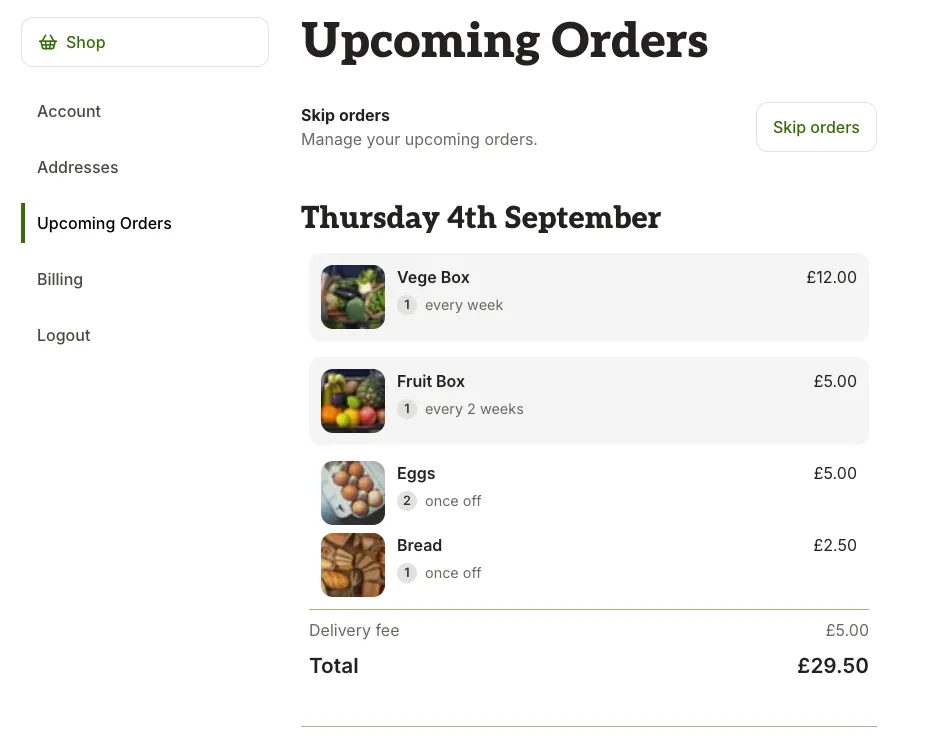
The frequency of this order can be changed by clicking on "Manage". Head to "Manage orders" and this will show you your upcoming orders.
To add extras to your order select any item available from the shop, click "Add" and check the date that this will be delivered.
When is the cutoff time for changing my order?
All changes to orders must be made by 11am on Wednesday, the week before delivery
How do I cancel my recurring order?
Login to your account. Scroll to the bottom of the page and click on "Cancel subscription".
How do I pay?
Once you have setup an account, or made your first order, you will be asked to fill in your card details. Payment will be taken for your first order before delivery. For all subsequent orders, payment will be taken a few days after delivery.
How do I update my card details?
Head to your account, and click on "Billing". You can then click on "Update card details" and follow the instructions.
Where and when do I get my orders?
We pack and deliver veg boxes on Tuesdays and Fridays each week. Your day of delivery depends on where you live.
You can choose to pick up your box from one of our collection points (we'll email you the full address and collection details once you have ordered). Alternatively you can choose home delivery.
Get delivery to your door for free if you spend over £45
Do I have to be home to receive a delivery?
No. If you are going to be out during the day please just let us know a suitable place for us to deliver the veg - ideally somewhere in the shade.
How do I use the website?
Below these FAQ's are some handy videos to help navigate the website, or head here.
Something is missing from my order
Sometimes we have to change the planned contents of the boxes, so first of all check that we haven't exchanged an item for something else. Occasionally an item that you have ordered is not available - we will remove this from your order and you will receive a message notifying you, you will not be charged for this item when payment is taken after delivery.
If it looks like we have made a mistake and we have simply missed an item in your order please let us know as soon as possible - best to email [email protected]
How do I pause my order if I am away?
Going away isn't a problem for your veg box delivery - our ordering system is totally flexible.
You can just pause your box for that time. Go to Orders > Manage Orders > Skip Orders.
You must do this by 11am on Wednesday the week before the delivery.
What are your thoughts on plastic packaging?
We try to minimise plastic packaging as much as possible. While we know that plastic packaging is not ideal, we also value freshness and go for the best solution for sustainability and freshness.
Are you certified organic?
Yes through the Soil Association. Organic Licence Number: AB30479
What are your growing practices?
We practise "minimum till", which is all about growing soil health.
All of our produce is grown sustainably without the use of synthetic pesticides, herbicides, fungicides, or fertilisers. We are certified organic, and go beyond the organic regulations in the way that we produce with soil health and biodiversity key guiding principles.
For more information about our growing methods, please ask, or head here. We're happy to answer any questions!
Where is the food grown?
Almost all of the produce in the veg boxes from May to November is grown at Trill Farm Garden. Outside of these months we supplement what we grow with produce from other organic growers in Devon - mainly Shillingford Organics, Bishops Farm and Riverford Organics. Due to our scale and soil type we just cannot grow enough of the winter veg to be able to produce enough to keep the boxes going all year round solely from our own produce, so we decide to partner up with other organic producers, meaning that you can get a box throughout the year. We do, however, only put seasonal produce in the boxes - so no tomatoes or cucumbers in the winter.
All of it is organic. All of it supports real farmers.
How can I help out your farm?
1. Volunteer – Occasionally we take volunteers, but this is not always possible. If you are interested please get in touch.
2. Donate – You can add on a Food bank donation as part of your order. This will pay for some of our produce to be donated to the Food bank, not only helping us but those who cannot otherwise afford our local, organic veg.
3. Spread the word – Tell your friends and family about us and share our Facebook and Instagram page!
How to Use the Ooooby Website
Learn how to add extras, skip or cancel, and check upcoming orders.
Adding Extras
You can add extra items to your box whenever you like:
Every week (default) → When you add an item, it will be included in each weekly delivery until you change it.
One-off → Select “One-off order” if you only want the item in your next delivery.
Skipping a Delivery
Heading away or need a break? You can skip an order:
Go to your Upcoming Orders in your account.
Select the week you’d like to skip.
Tap Skip this delivery.
If your shop has the option to donate your order, you can also choose to do this here.
Cancelling Your Subscription
If you no longer want your subscription, you can cancel anytime:
Go to Manage Orders.
Click on Account.
Select Cancel subscription and confirm the cancellation.
Confirming Your Upcoming Orders
Want to double-check what’s coming?
Visit My Orders to see your next deliveries.
Any extras or skips will show clearly.